
Six capabilities, and they feed each other
The register is the spine. Classification tells you what the law asks of each system; the gap tracker tells you what the standard asks of the organisation; evidence proves it; the documents are what you hand over. Nothing here is a separate silo you have to keep in step by hand.
1 · The AI system register
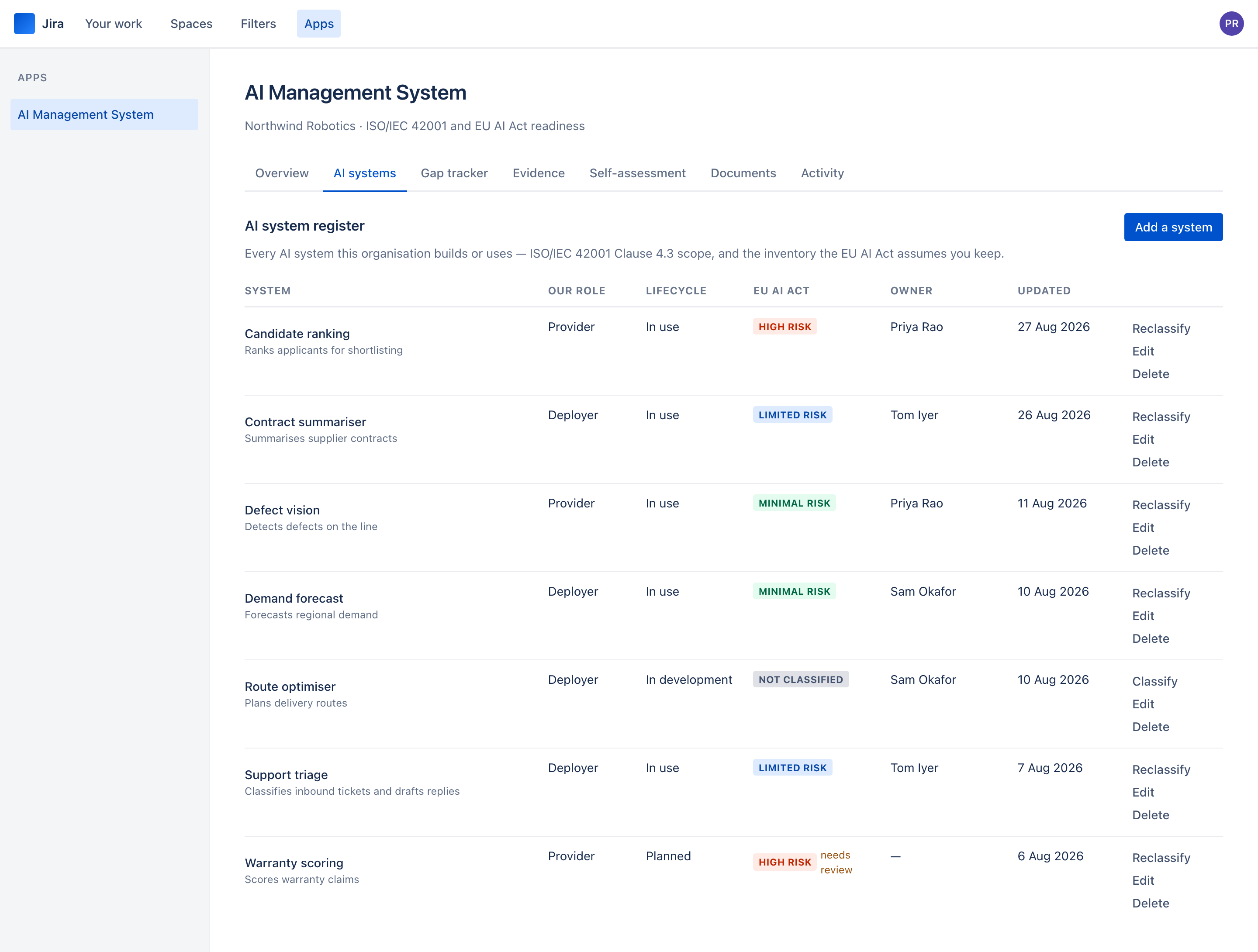
Every AI system your organisation builds or uses, in one list. For each one: what it does, who owns it, whether you are its provider (you develop it or put your name on it), its deployer (you use it under your authority) or both, and where it is in its life — planned, in development, in use, or retired.
That distinction is not bureaucracy. Under the EU AI Act, a provider and a deployer of the same system carry different obligations, and the register is where you decide which you are before anybody asks.
Because the role decides the obligations, changing it on a system that has already been classified re-runs the classification with the new role. Your other answers are kept, and the audit trail records that the system was reclassified and why.
A retired system stays on the register with its history intact, which is what you want when an auditor asks what you were running in March. Deleting is for a mistake.
2 · EU AI Act classification
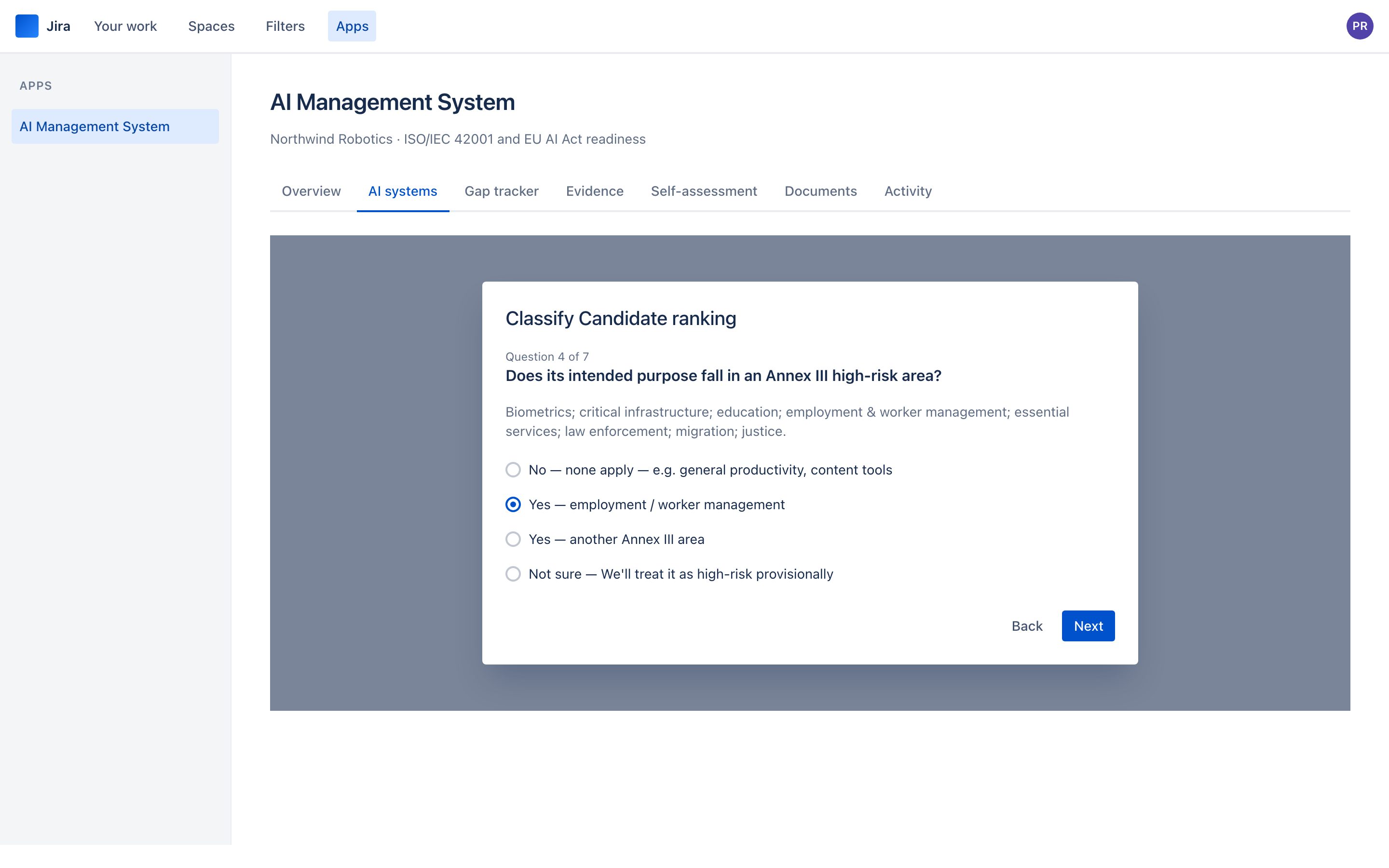
Seven questions per system. Do you provide it or deploy it? Does it do anything Article 5 prohibits? Is it a safety component of a regulated product? Does its purpose fall in an Annex III high-risk area? Does the Article 6(3) narrow-task derogation apply? Do any Article 50 transparency triggers apply? Do you provide a general-purpose AI model?
The answers resolve to a tier — prohibited, high, limited or minimal — and a list of the obligations that follow, each with its article. A provider of a high-risk system gets twelve; a deployer gets seven; transparency and GPAI obligations layer on top of any tier.
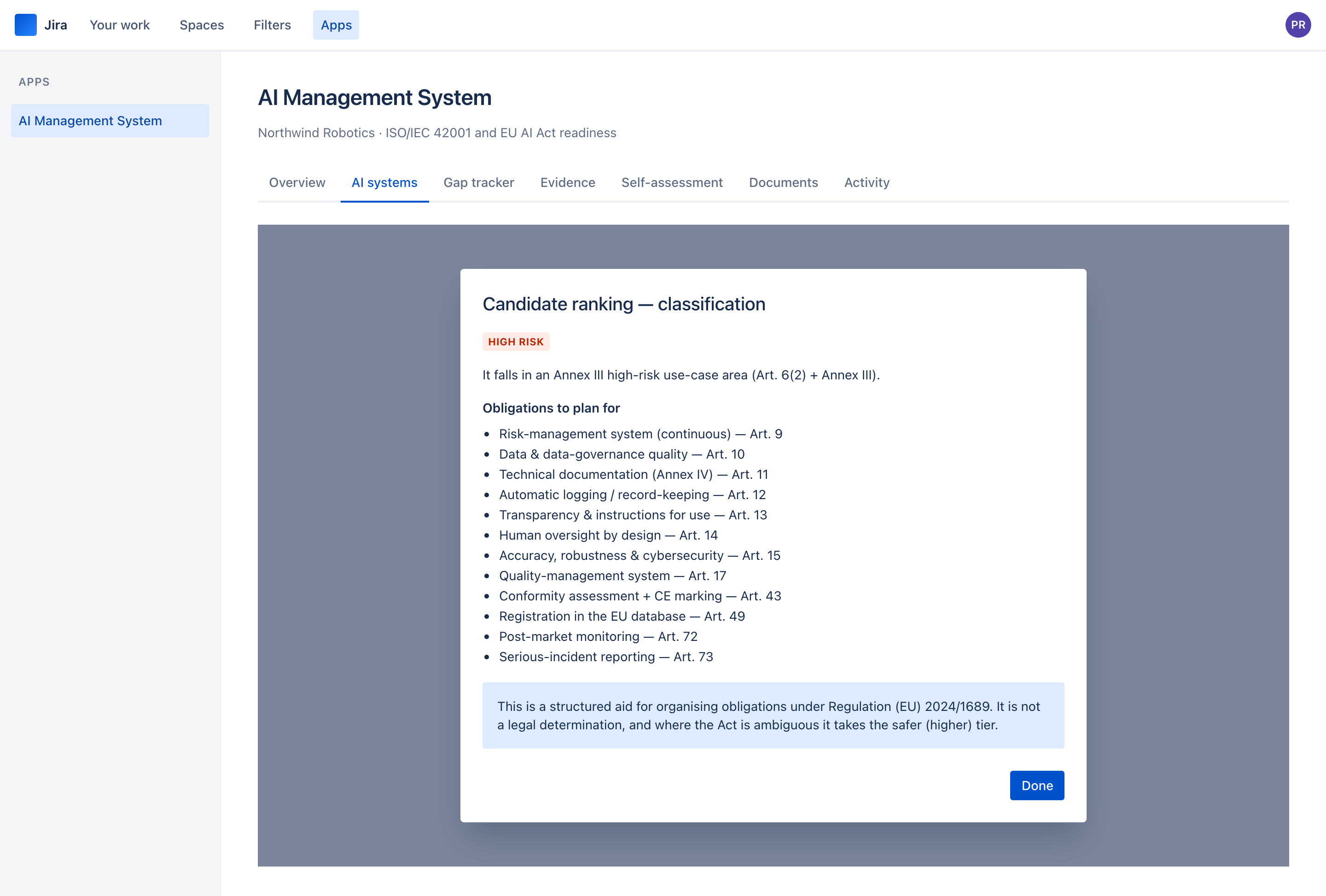
The app says so on the result itself. It organises obligations under Regulation (EU) 2024/1689 so you can act on them; it does not tell you that you comply, and where the Act is ambiguous it deliberately errs high.
3 · The ISO/IEC 42001 gap tracker
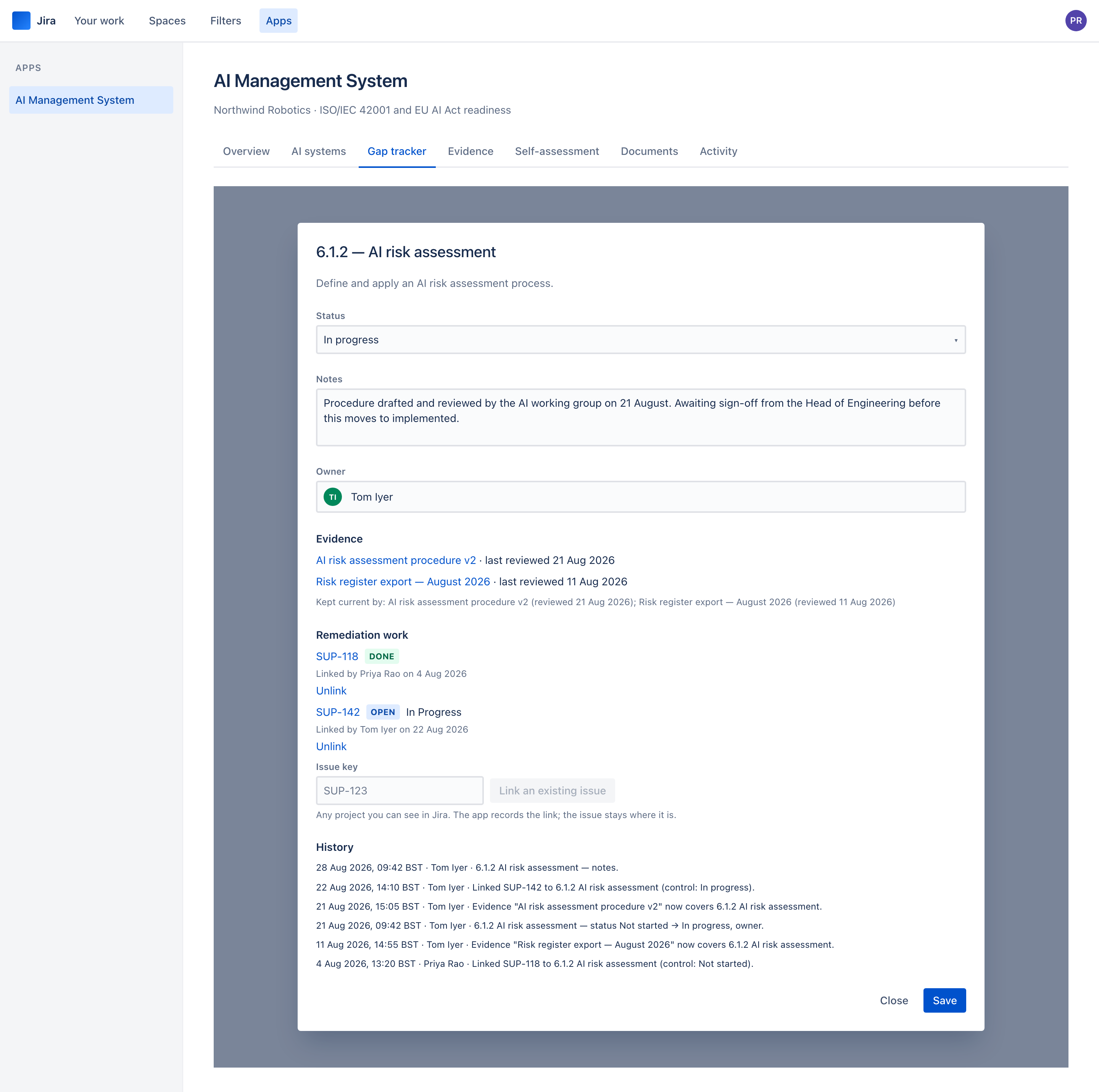
65 controls: 27 from clauses 4 to 10, and 38 from Annex A. Each carries a status — not started, in progress, implemented, or not applicable — an owner, free-text notes, and the evidence attached to it.
Controls marked not applicable are excluded from the denominator rather than scored as zero, which is how a Statement of Applicability is supposed to work. Your readiness figure is over the controls that actually apply to you.
The work that closes a gap is usually already in Jira, so a control can be linked to the issues doing it. Type an issue key on the control and the app records the link — the issue's id and key, who linked it and when. It stores nothing else about the issue: status and resolution are read from Jira each time, as the person looking, so somebody who cannot see an issue in Jira is told it is not visible to them and learns nothing more. The issue itself is never changed, and the app creates nothing in Jira. Unlinking asks for a reason, which goes on the control's history.
The gap tracker shows how many issues are linked to each control and how many are still open, and the overview gives the total. Where the claim and the work disagree, the control says so: "This control is marked implemented, and linked work is still open", or "All linked work is done, and this control is not implemented".
An implemented control is only as good as its evidence. When an implemented control has no evidence, evidence nobody has dated, or evidence overdue for review, a label says so beside its status — Implemented — no evidence, Implemented — evidence never reviewed or Implemented — evidence out of date — and a filter lists every one of them. The overview carries the same caveat beside the readiness figure: how many implemented controls rely on out-of-date or no evidence. The status stays what somebody claimed; the caveat sits beside it, rather than the app quietly marking your work down.
Every change is recorded: who moved a control, from what to what, and when, to the minute. That history is append-only — nobody can edit or delete it, including a Jira administrator, because a history that can be tidied is not evidence.
4 · Evidence
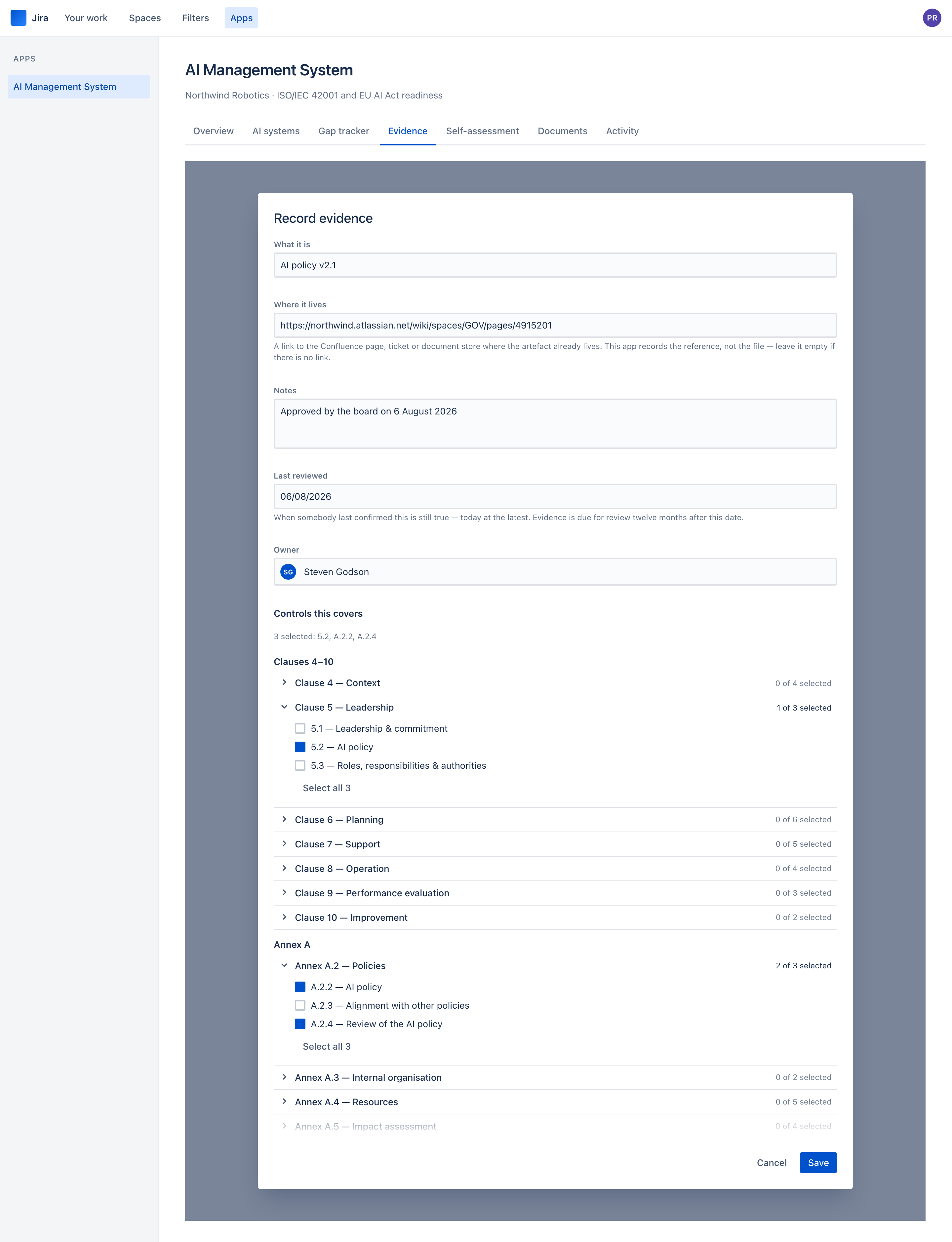
An evidence record is what proves a control is in place: a title, a description, who owns it, when it was last confirmed still true, a link to where it lives, and the controls it covers.
The last-reviewed date is today at the latest — a review that has not happened yet is not one the app will record — and the evidence falls due for review twelve months after it. The evidence list shows when each record is due, and filters to what is due now and to what has no review date at all.
The app stores the reference, not the file. Your policy stays in Confluence, or SharePoint, or wherever your organisation already keeps it — with the permissions and the retention it already has. That is a deliberate decision, not a limitation: an app that holds your governance documents has taken on retention, deletion and export obligations that a link does not.
The link is optional, because some evidence genuinely is a signed policy in a filing cabinet, and a form that demands a URL for that gets a URL somebody made up.
5 · The readiness self-assessment
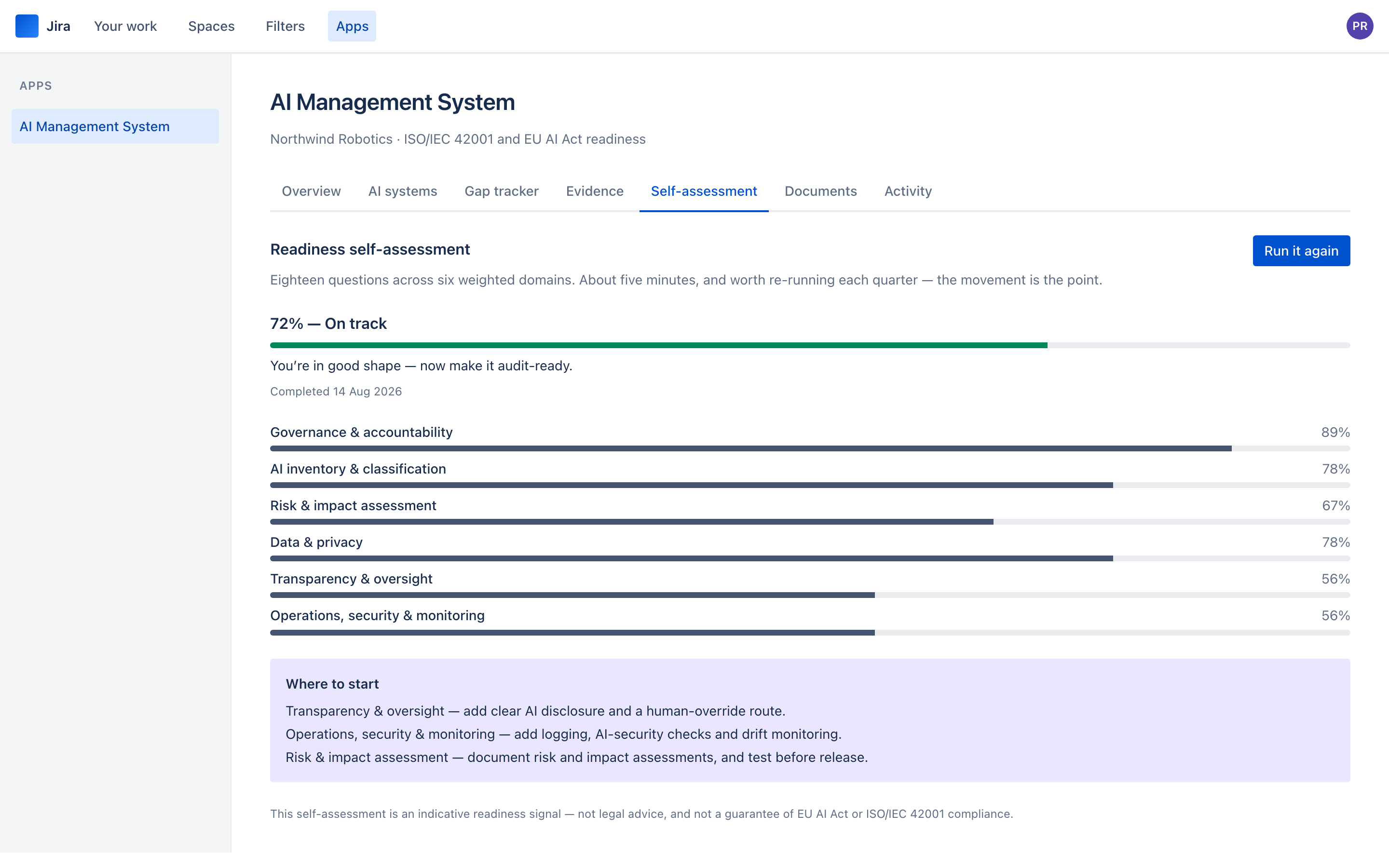
18 questions across 6 weighted domains — governance and accountability (18%), AI inventory and classification (22%), risk and impact assessment (22%), data and privacy (13%), transparency and oversight (12%), and operations, security and monitoring (13%).
Each question is answered on a four-level maturity scale: none, ad hoc, defined, managed. About five minutes. It produces a weighted score, a band, a per-domain breakdown and a short list of where to start.
Every run is kept. Re-run it each quarter and the movement is the point — it is the artefact that shows a board the programme is working, which a control checklist does not.
6 · Documents
6 documents, generated from your own data:
- AIMS Policy — the policy Clause 5.2 asks for, scoped to the systems on your register, ending in an approval and sign-off table: the person who generated it and the date, and a blank line for top management to sign.
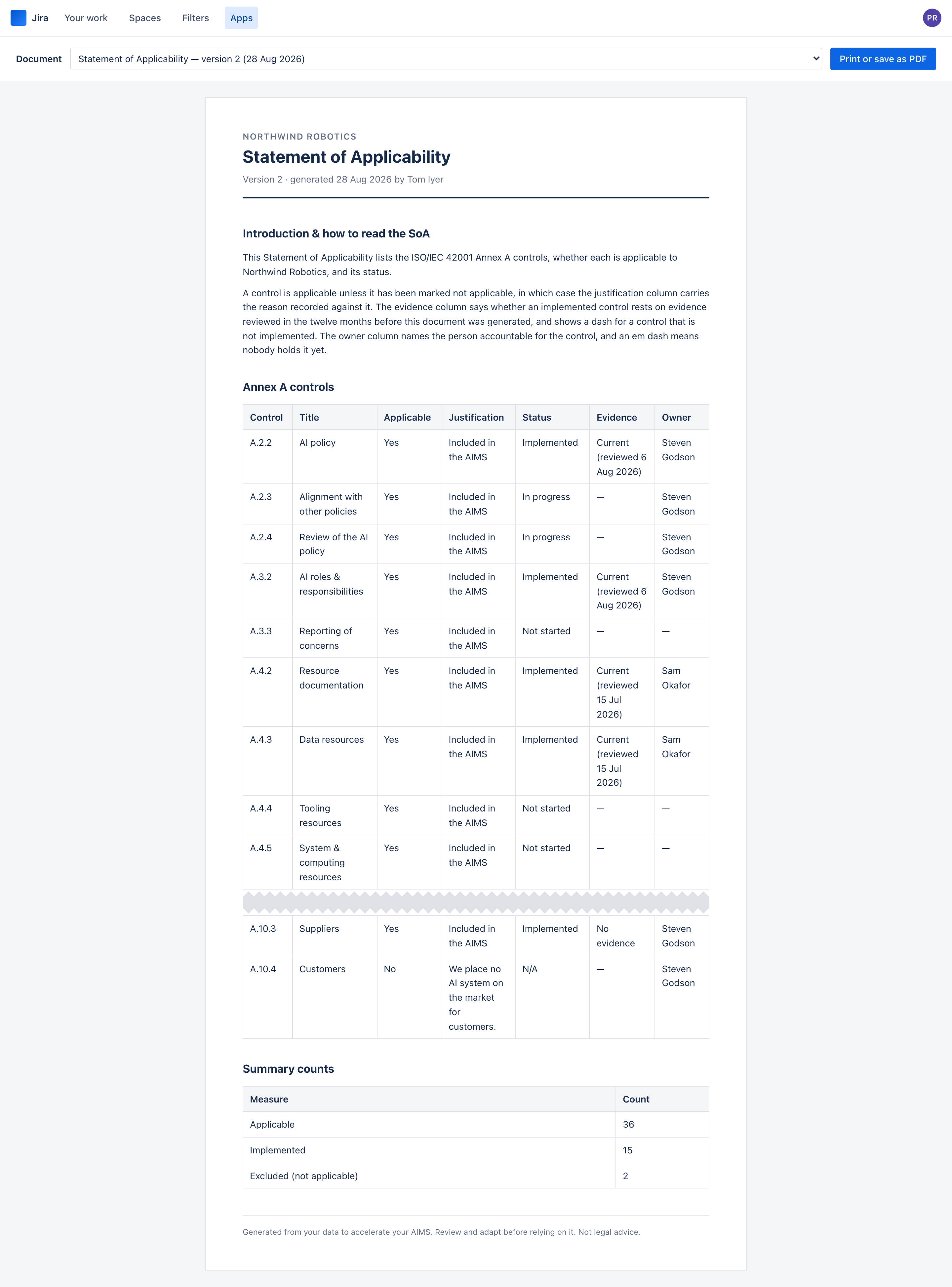
- Statement of Applicability — every Annex A control, whether it applies and why not where it does not, its status, whether the evidence behind an implemented control is current on the day it was generated, and its owner.
- AI Risk Register — the risks your classifications imply, and how each is being treated.
- AI System Register — the inventory, with each system's role and tier.
- AI System Impact Assessment — one per system, which is what Clause 6.1.4 and Article 27 both assume.
- Roles & Responsibilities — who holds what access, and who granted it.
Each version is an immutable snapshot. Generate the Statement of Applicability today and again in March, and the first one still shows what was true today — which is the only reading of "version history" an auditor accepts.
Have a look at it properly
The user guide walks through all six, end to end, with the screens as you will meet them.